hero background image

Collaborative CRM:
an end-to-end solution overview

December 30, 2025

Key collaborative CRM software capabilities

Key collaborative CRM software capabilities

Shared contact records

Consolidating prospect and customer data, including personal or company details and customer interaction histories, into unified records accessible to all customer-facing teams, ensuring a shared, 360-degree view of each contact.

Task & activity management

Streamlining activity management across different departments, such as lead handover from marketing to sales teams, with automated task assignment and triggered notifications, to ensure consistent and effective engagement throughout the customer journey.

Communication & collaboration tools

Enabling team members to discuss deals, cases, or other customer-related matters and coordinate their efforts in real-time with features like internal chats, activity feeds, note sharing, and document collaboration, fostering teamwork and productivity.

Role-based access & permissions

Managing which users or teams can view, edit, or delete certain types of data (contacts, deals, etc.) or access specific CRM functionality based on their roles and responsibilities, enabling seamless collaboration and data sharing without sacrificing data security and compliance.

Integration with third-party tools

Connecting CRM software with project management apps, marketing automation platforms, and other external applications via out-of-the-box APIs or low-code/no-code integration tools to create a unified digital workplace where users can collaborate and access CRM data without constantly switching between systems.

Build a tailored CRM solution with Itransition’s guidance

Get in touch

Benefits of adopting a collaborative CRM system

For the whole company

Data-driven decision-making

A collaborative CRM solution centralizes customer data collected from all departments for analysis and promotes internal communication and knowledge sharing. This provides users with a comprehensive view of each customer and the audience as a whole, helping your teams make more informed decisions regarding which segments to target, which leads to prioritize, and other key aspects of customer relationship management.

Improved operational efficiency

Automated workflows and seamless data sharing across departments reduce the time employees have to spend assigning tasks, searching for customer information, and completing other clerical tasks, allowing them to focus on higher-value activities.

Superior customer experience

With every team member having a full context of each client relationship (individual customer needs, past interactions, etc.), your company can deliver consistent and personalized experiences across the customer journey and thus maximize customer satisfaction.

For marketing teams

Marketers can get feedback on converted customers from sales and service teams (product preferences, common pain points with products purchased, etc.) to optimize their targeted, multi-channel marketing campaigns and boost lead acquisition.

For sales teams

Sales reps have full visibility into a prospect's interaction history (marketing content downloaded, product inquiries to service teams, etc.) to fine-tune their engagement strategies and identify upselling and cross-selling opportunities.

For service teams

Service specialists receive detailed information on open and closed deals (specific product configuration requirements, products purchased, etc.) to quickly address related support requests, cutting response times and fostering customer retention.

Popular CRM platforms with collaborative functionality

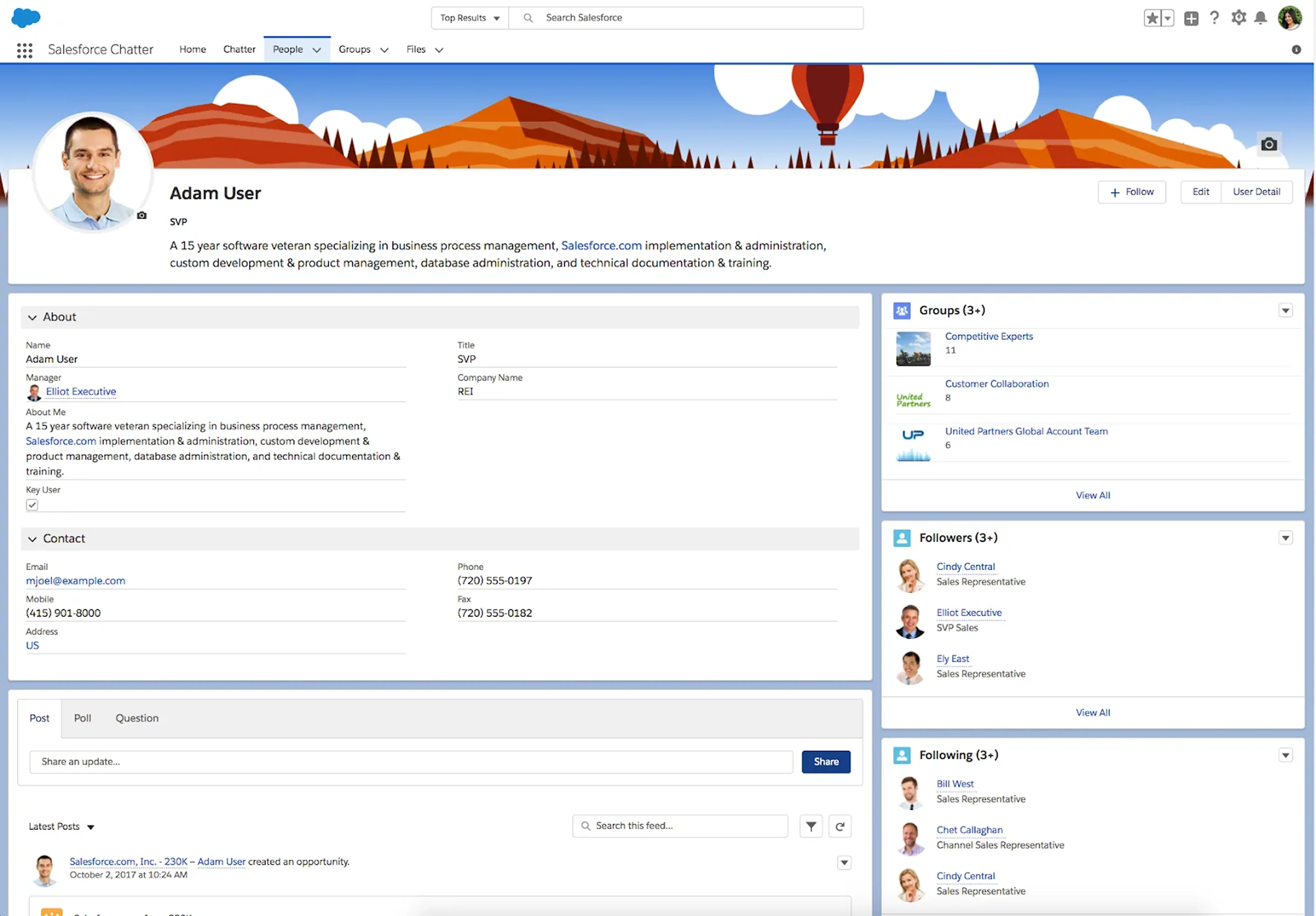
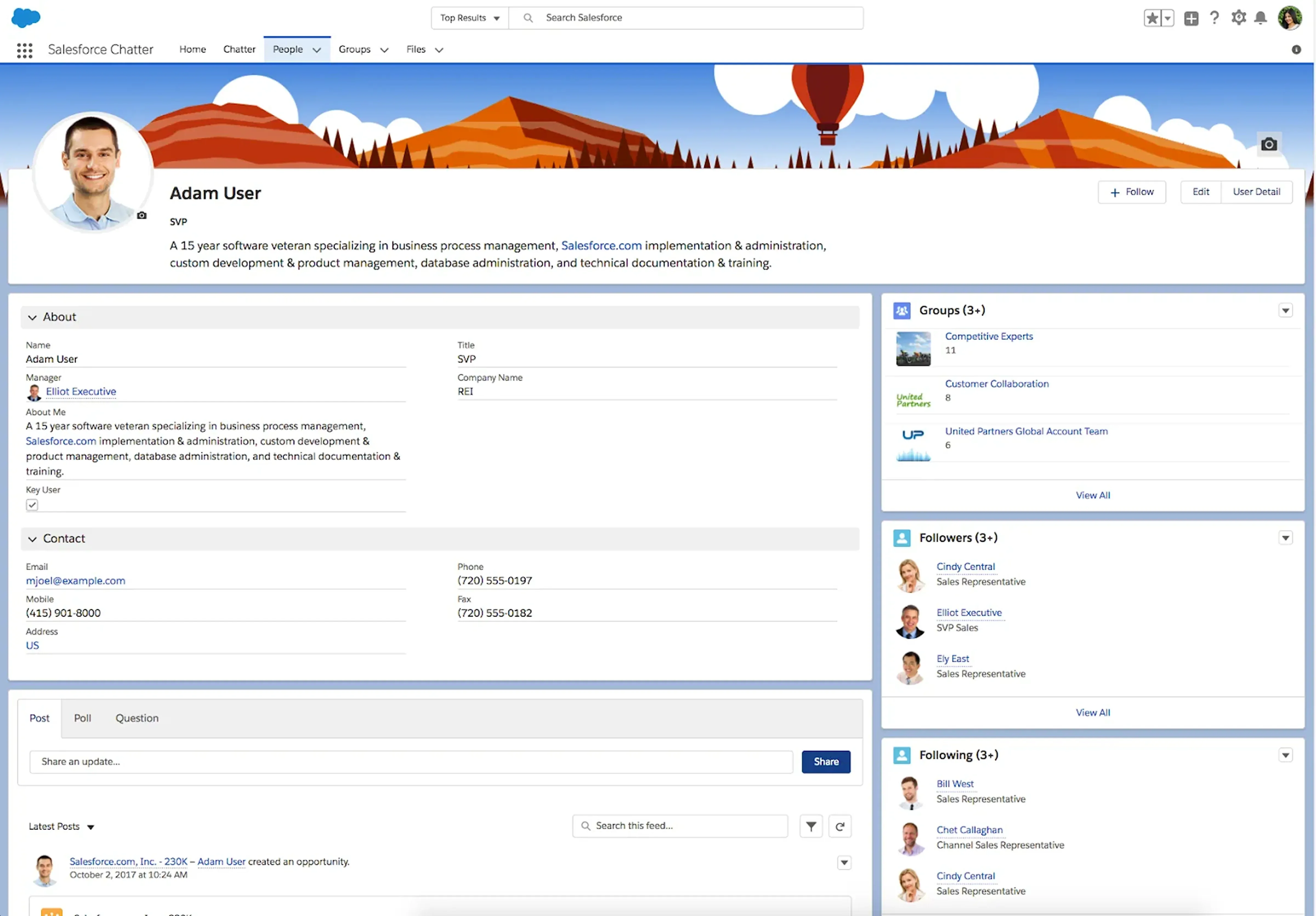
Salesforce has been the undisputed CRM market leader for over a decade. The platform comprises multiple products or “Clouds” addressing the needs of specific departments or industries and boasts extensive AI capabilities powered by Einstein and Agentforce.

Salesforce CRM

Image title: Salesforce’s Chatter interface
Image source: Salesforce

Key collaboration capabilities
  • Shared and centralized account and contact data, including cross-channel interaction histories and related tasks, notes, and files
  • Role Hierarchy system enabling role assignment and role-based data visibility and access
  • Chatter social networking and collaboration tool providing features like feed tracking and mentions, enabling employees to work together on sales opportunities, service cases, and more
  • Experience Cloud sites and Partner Relationship Management tool facilitating collaboration with partners via CRM data sharing and co-selling deal tracking
  • Flow Builder enabling automated business process design across marketing, sales, and service departments, such as routing a qualified lead to the right sales rep or assigning new tasks to field teams
  • Seamless integration with Slack (now part of Salesforce) for sharing Salesforce records via Slack conversations
Limitations
  • Complex modular licensing
  • Pricey top-tier plans compared to other platforms
Pricing
  • Multiple tiered plans for every Cloud
  • Plans starting at $25/user/month
  • 30-day free trial

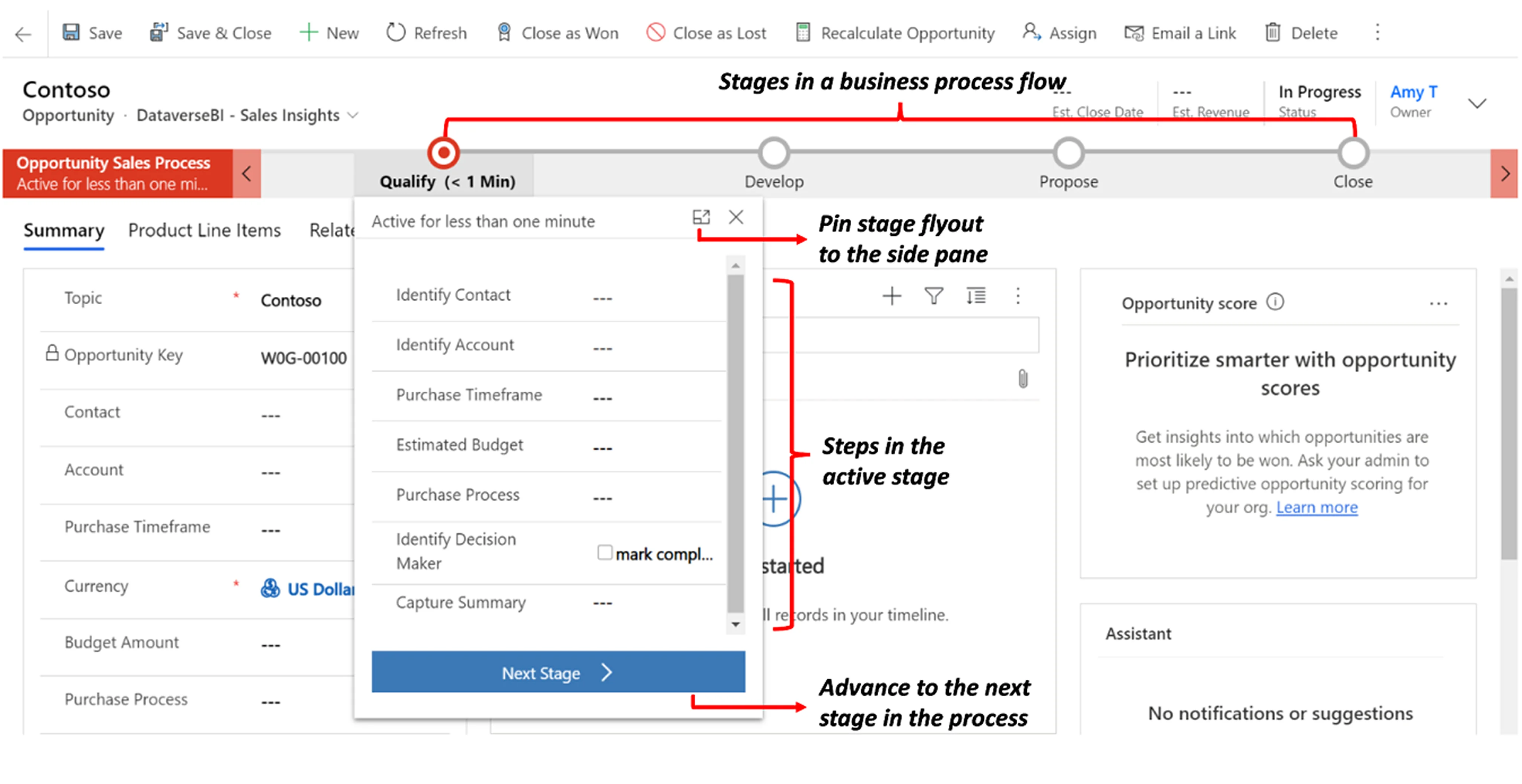
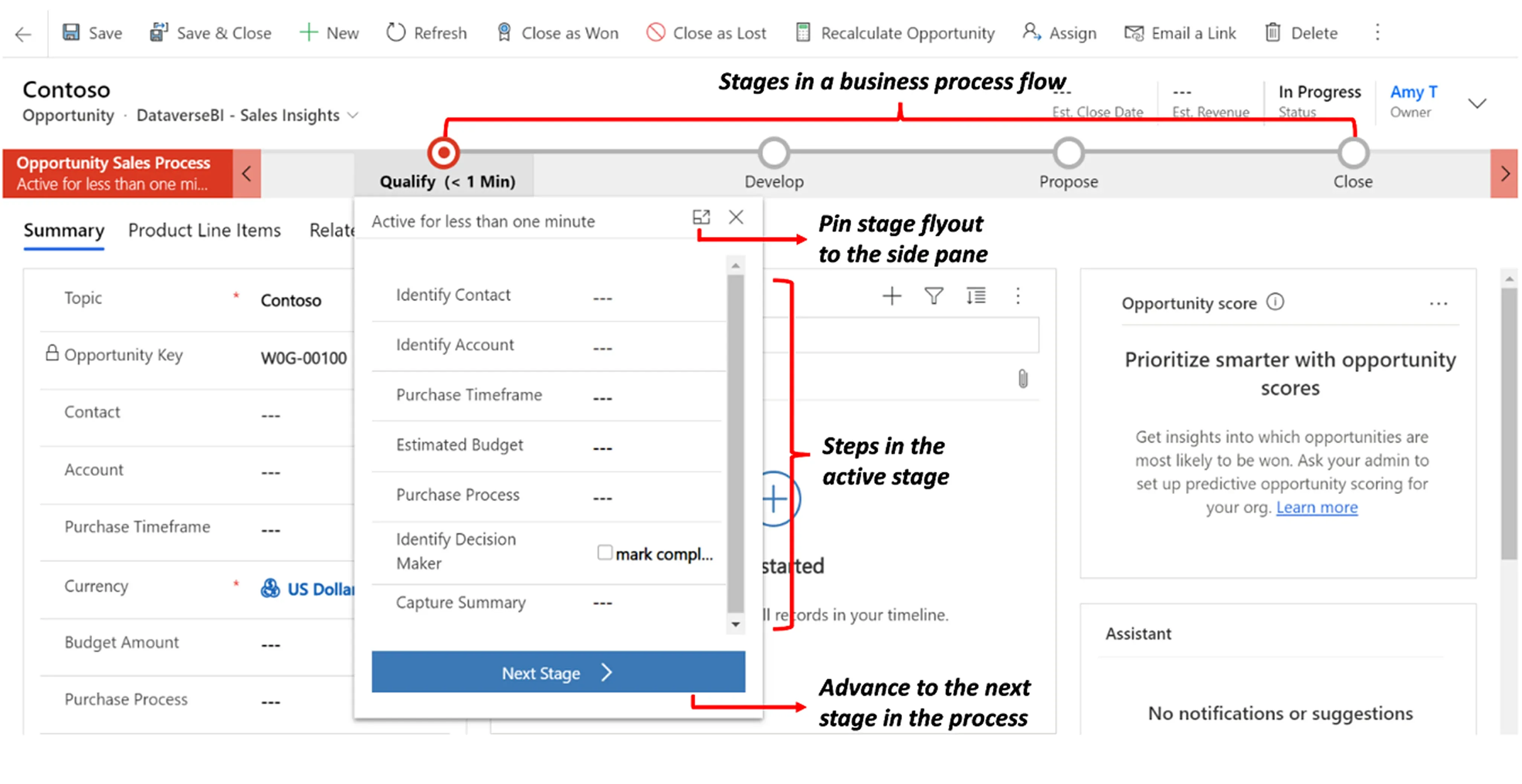
Dynamics 365 is a comprehensive, AI-powered business suite that includes CRM functionality for marketing, sales, and service management and seamlessly integrates with other Microsoft products.

Dynamics-365

Image title: Business process flow in Dynamics 365
Image source: Microsoft

Key collaboration capabilities
  • Business process flows for creating visual guides defining key steps of your CRM operations, including cross-functional ones, helping employees follow standardized workflows and manage customers more consistently
  • Security roles and privileges defining how different users, such as sales reps or service agents, can access specific types of records
  • Native integrations with Outlook for collaborating via email directly from the CRM interface, with SharePoint for document collaboration within the CRM, and with Microsoft Teams for connecting Dynamics records to Teams chats
  • Activities timeline for creating and tracking all activities associated with a certain record, including emails, appointments, and phone calls
Limitations
  • Complex configuration and administration
  • Limited off-the-shelf integrations with third-party software
Pricing
  • Multiple tiered plans for each product
  • Full licensing guide available on the Microsoft website
  • 30-day free trial

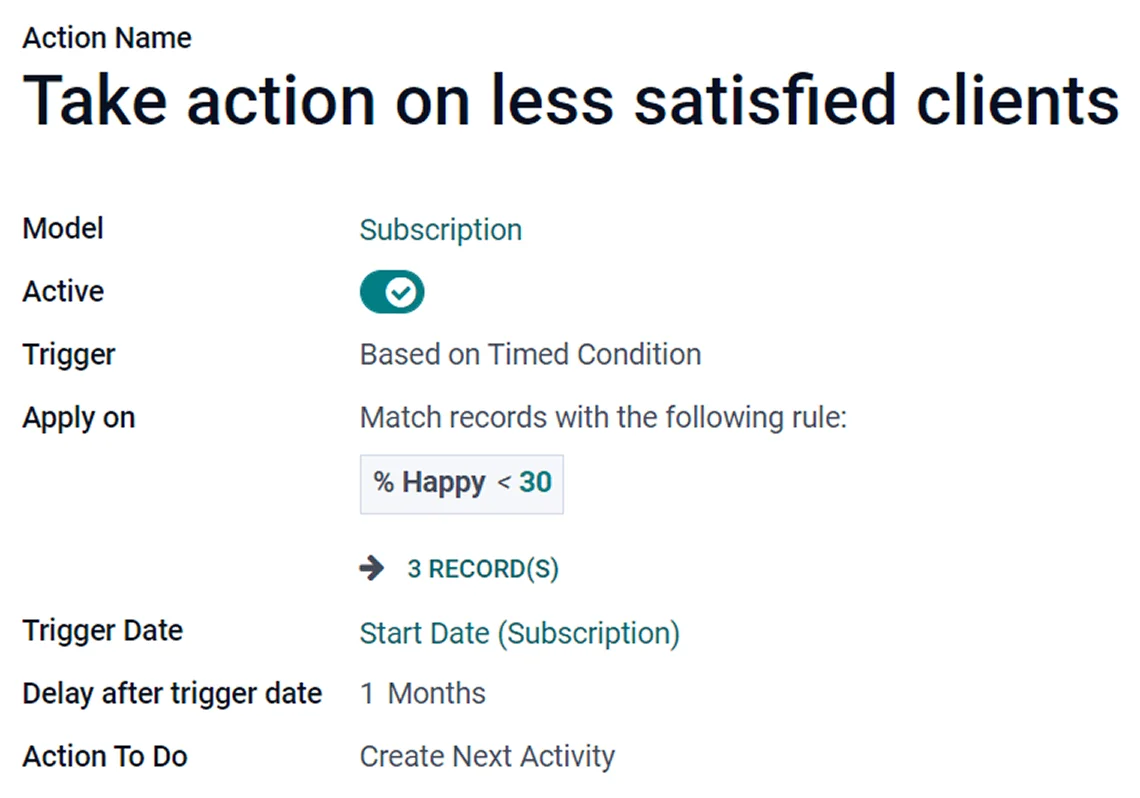
Odoo is a flexible and extensive suite of business apps combining CRM and ERP functionality. Its main differentiator is the possibility to choose between an open-source version (Odoo Community) and a licensed SaaS option (Odoo Enterprise).

Odoo

Image title: Rule automation in Odoo
Image source: Odoo

Key collaboration capabilities
  • Chatter messaging tool for streamlining communication and collaboration among team members via log notes, file sharing, and activity scheduling
  • Odoo Knowledge app for centralizing key business information and content into a shared knowledge base and organize it with the help of customizable fields
  • Automated actions for automating cross-functional workflows based on predefined triggers and conditions
Limitations
  • Complex customization compared to other options
  • Not user-friendly for beginners
Pricing
  • Free SaaS plan for a single app
  • Two paid SaaS plans starting at $24.90 per user per month
  • Billed monthly or annually, with a discount for the latter option

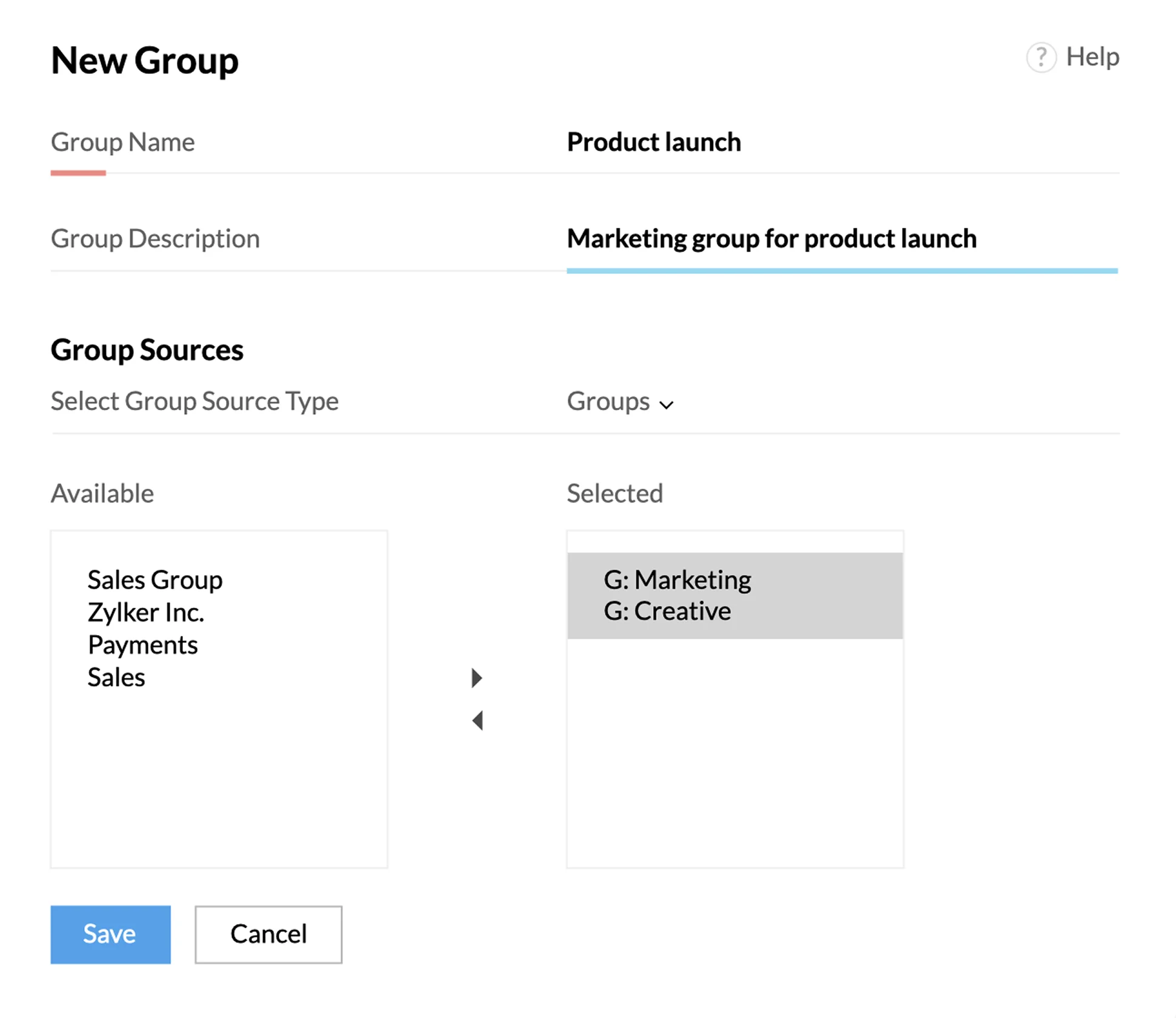
Zoho offers a rich selection of CRM and ERP products, including applications for marketing, sales, customer support, HR, finance, and project management, as well as a fully customizable user interface and hundreds of out-of-the-box integrations.

Zoho CRM

Image title: Soho’s feature to create performance groups
Image source: Zoho

Key collaboration capabilities
  • Feeds feature for discussing deals with team members, share sales collaterals, make announcements, and receive record updates
  • Performance groups functionality for assigning team members to specialized groups with shared goals and duties (selling, team support, etc.)
  • Chat integration with Zoho Cliq, Teams, and Slack with the option for sending automated sales updates to other colleagues
Limitations
  • Complex integration with third-party tools
  • Poor support reported by some adopters
Pricing
  • Multiple plans with pricing available on the website
  • Monthly or yearly billing, with a discount for the second option
  • 15-day or 30-day free trial depending on the plan selected

HubSpot is a CRM solution encompassing multiple software products named “Hubs” and recently focusing on agentic AI for process automation.

HubSpot

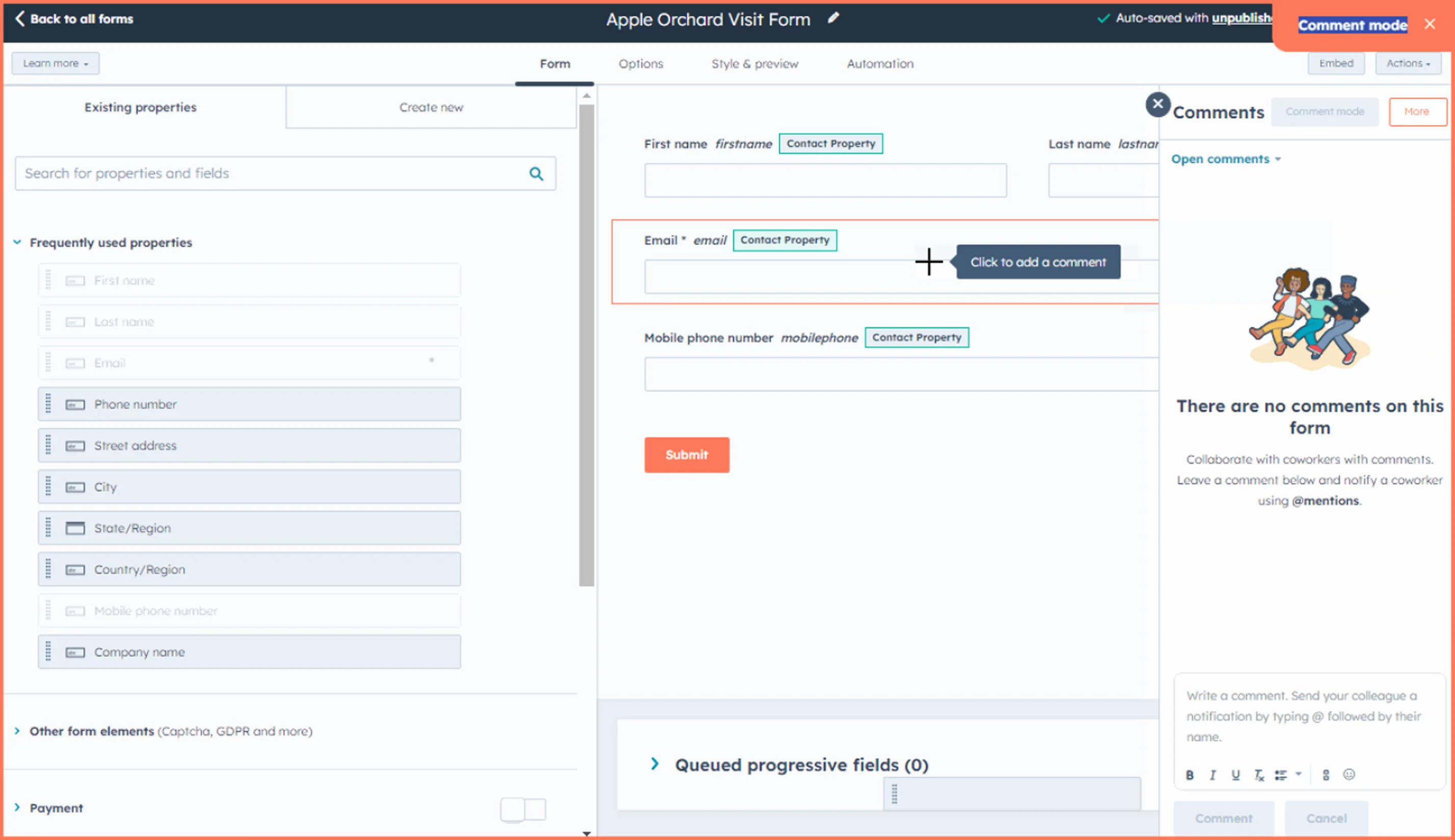
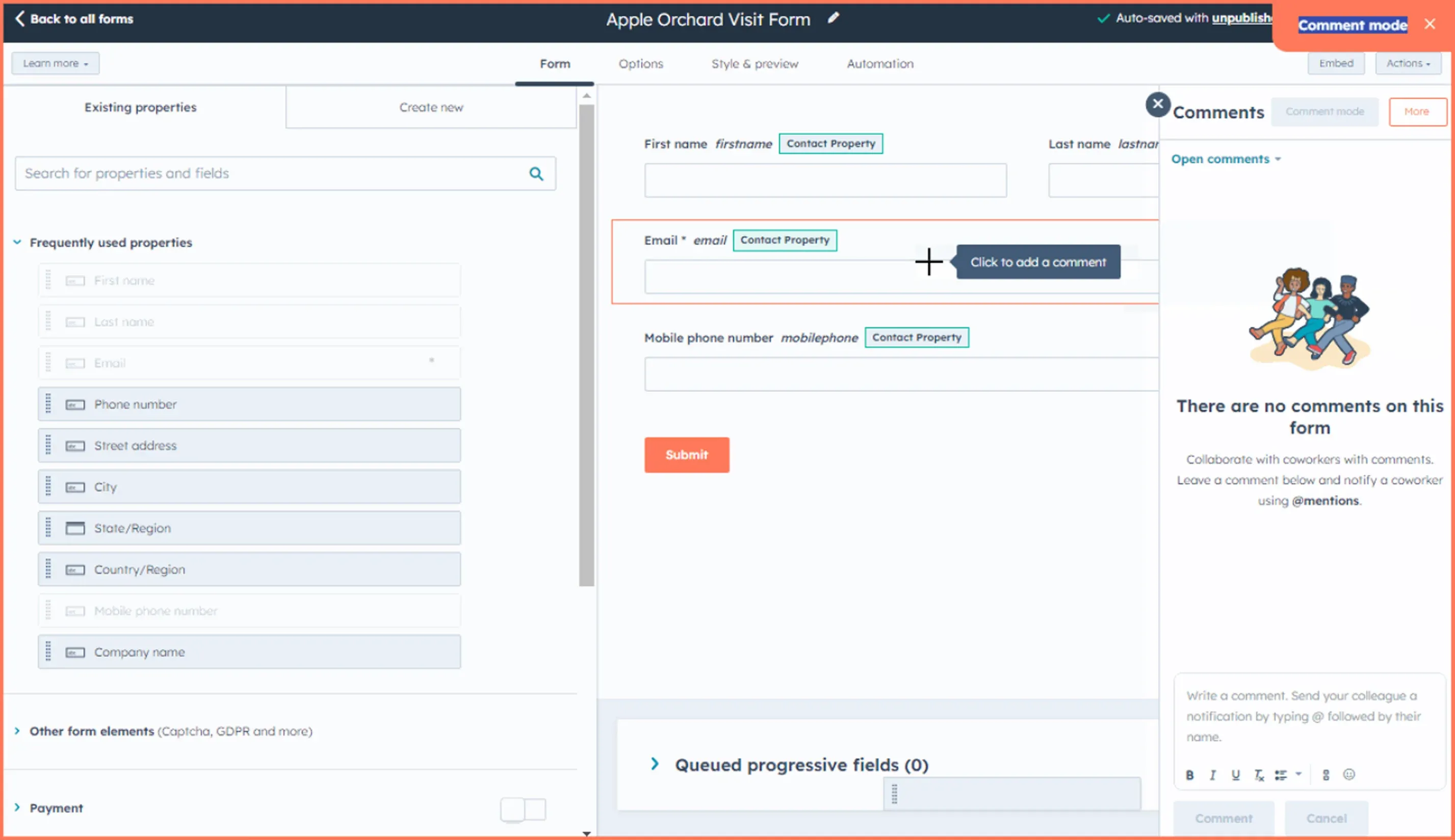
Image title: HubSpot’s collaboration sidebar
Image source: HubSpot

Key collaboration capabilities
  • Collaboration sidebar for reviewing your assigned tasks and adding comments or asking your team for feedback on various assets (CRM records, marketing content, communications, etc.)
  • Conversations inbox for monitoring conversations across communication channels and replying to messages via a unified tool
  • Internal notes that can be logged to any customer record to provide other team members with context before scheduled meetings
Limitations
  • Steep learning curve
  • Limited range of features in entry-level plans
Pricing
  • Two plans for each product, full pricing available on the website
  • Free Tools plan and Starter Customer Platform plan with basic features
  • Option to create discounted product bundles

Pipedrive is a user-friendly customer relationship management platform that provides users with rich lead management and sales automation functionality.

Pipedrive

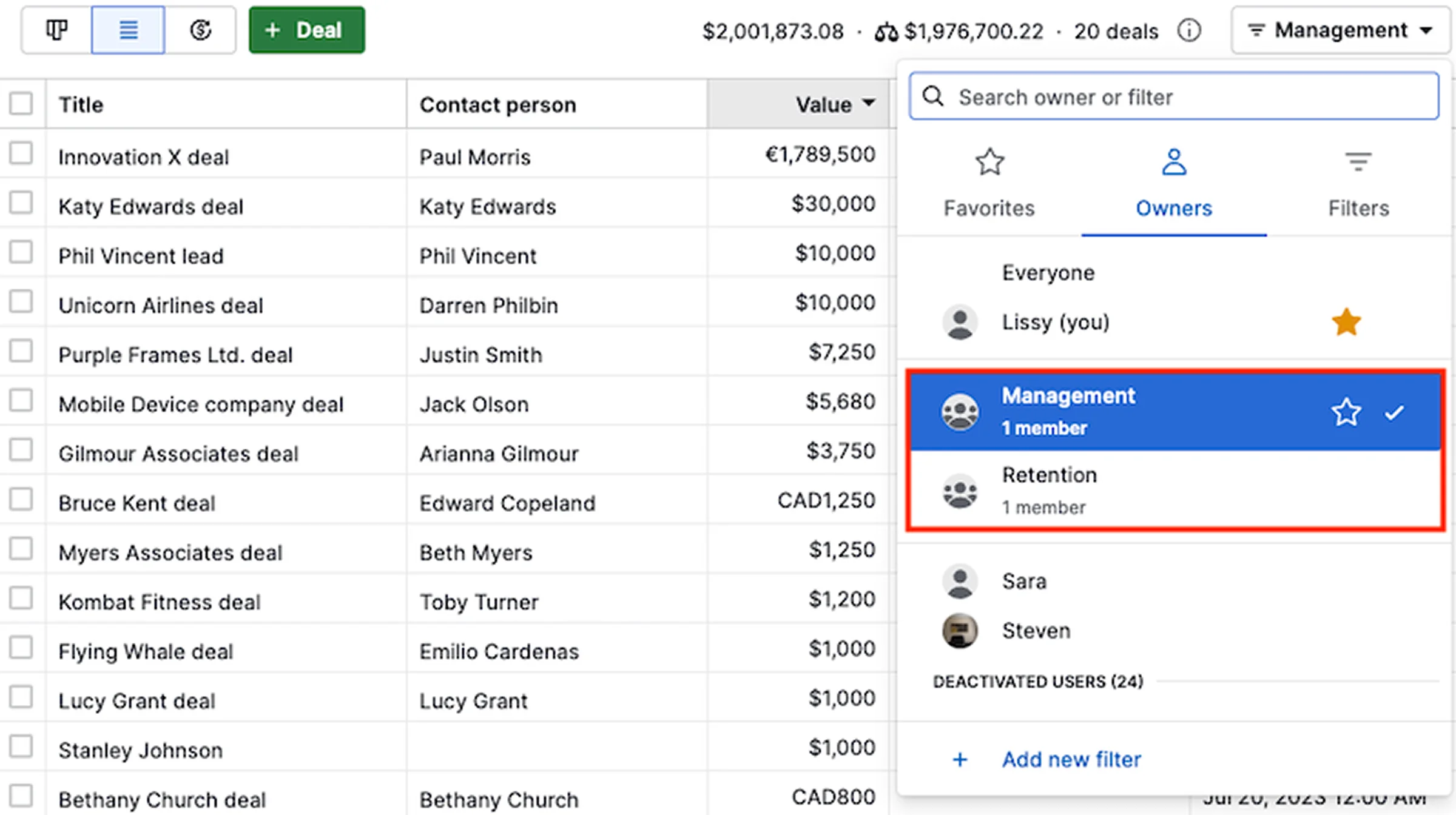
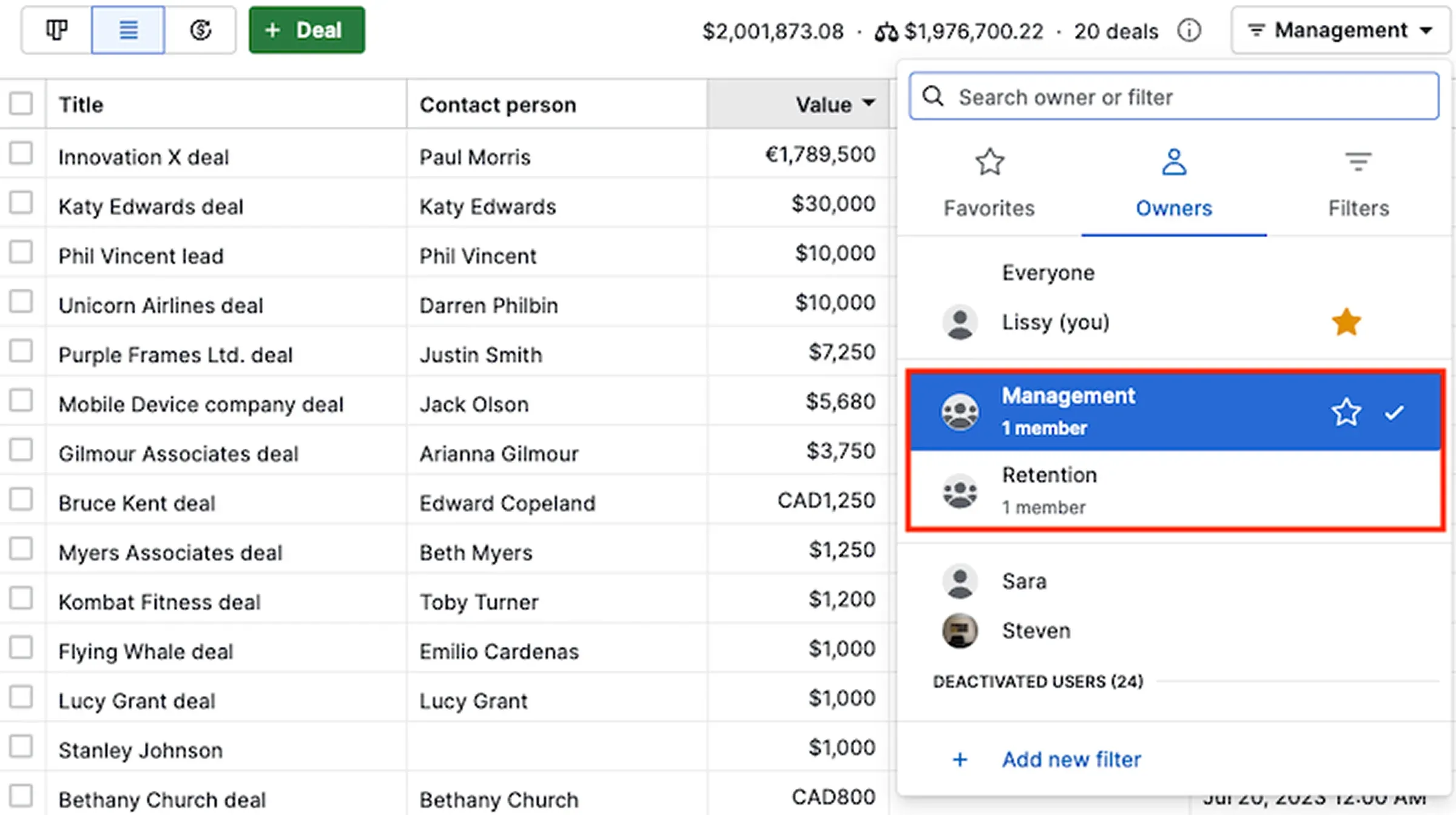
Image title: Pipedrive’s Teams dashboard for team filtering
Image source: Pipedrive

Key collaboration capabilities
  • Teams feature for organizing salespeople into teams with shared goals and helping managers track each team’s progress
  • Insights tool featuring sharable reports and dashboards with real-time change tracking for maximum data accuracy
  • User permission sets for defining what tasks sales reps can perform and what CRM data they can access
Limitations
  • Lack of native integrations with some popular tools like Zoominfo
  • Limited range of analytics features
Pricing
  • Four plans, starting at $14 per seat per month
  • Billed monthly or yearly, with a discount for the latter option
  • 14-day free trial

Itransition provides full-cycle CRM services and tailored solutions, helping companies streamline their customer relationship management workflows and promote collaboration across teams and departments.

CRM consulting

CRM consulting

Itransition’s consultants help you plan and supervise every stage of your CRM initiative, including business needs analysis, project planning, and user training, ensuring that the solution delivered fully meets your requirements.

Looking for a reliable CRM implementation partner?

Turn to Itransition

Integrating collaborative capabilities into every CRM solution

With complex workflows spanning multiple departments and diverse audiences expecting personalized experiences, all customer-facing teams need to be on the same page. Collaborative CRM is the software solution companies should adopt to achieve this goal. That said, the concept of collaborative CRM as a separate, ultra-specialized entity is becoming obsolete, as all major platforms available on the market provide organizations with a comprehensive set of collaborative, functional, and analytical capabilities to meet all their business needs at once.

Team up with an experienced IT partner like Itransition to implement a CRM solution tailored to your unique business requirements and cross-department workflows.

FAQs

Over the years, CRM systems have traditionally been classified into three main types, each with different functionality and suited to specific use cases. Nowadays, however, this categorization is largely conceptual, as most CRM tools encompass a wide range of features which cover multiple aspects of customer relationship management.

  • Collaborative CRM
    focuses on facilitating information sharing and coordination across marketing, sales, and service teams to boost productivity. Its differentiating features include shared contact records, internal chats, activity feeds, team task assignment, and role-based permissions. It’s an ideal tool for companies with complex, cross-department business operations and suffering from information silos.
  • Operational CRM
    helps organizations automate and optimize CRM processes to maximize operational efficiency with features such as lead capture from social media, corporate websites, or other touchpoints, automated sales follow-ups, and service case routing. It can be a good choice for businesses overwhelmed by manual workloads due to high-volume customer transactions.
  • Analytical CRM
    enables companies to derive insights from customer and other business data for better decision-making. Common functionality includes audience segmentation, sales forecasting, sentiment analysis, and customer churn prediction. It’s best suited for organizations looking for new opportunities or areas for improvement in their CRM operations.

If you opt for an off-the-shelf CRM platform over custom CRM software, you should prioritize a solution whose out-of-the-box capabilities (feature set, integration options, etc.) cover most of your functional requirements. Other key selection factors include configuration and customization possibilities, user-friendliness, convenient pricing terms, and free trial periods

Like any other type of CRM, collaborative CRM solutions are evolving in line with new technological developments and emerging business needs:

  • AI in CRM
    An expanding range of key features powered by AI, with a particular focus on agentic AI for CRM process automation over the past few years.
  • Mobile CRM
    A seamless user experience on smartphone and tablet, typically through a dedicated mobile app.
  • IoT-CRM integration
    Closer integration between CRM systems and IoT devices to collect data in real time, for instance to facilitate field service operations.

Common CRM implementation challenges include:

  • Integration complexities
    Your collaborative CRM and other applications in your IT environment can use different communication protocols, resulting in potential incompatibilities. In this case, you should select a suitable approach to integrate heterogeneous systems, such as an enterprise service bus (ESB) serving as a middleware to convert different protocols.
  • Data migration issues
    Migrating data from your legacy systems to a new collaborative CRM can compromise the quality of your data assets with each solution storing and processing information differently. To prevent this, adopt a data governance strategy covering data mapping, transformation, and validation.
  • Data security
    Serving as a unified data repository, a collaborative CRM solution can be an ideal target for cybercriminals looking to access and exploit sensitive customer information.That’s why you should adopt a CRM product or equip your custom CRM with robust security mechanisms, including data encryption or access controls.

Collaborative CRM solutions typically comprise two main functional areas:

  • Interaction management
    Tracking all interactions with customers and prospects across different channels to help marketing, sales, and service teams develop shared practices and strategies for customer communication.
  • Channel management
    Identifying which channels customers prefer to use when connecting with your business and which channels are more effective to engage or get back to them.